Unlocking the Power of Snowflake Warehouses: Optimization Techniques for Data-driven Success

The quote "Data is the new oil," attributed to Clive Humby, a British mathematician and entrepreneur, highlights the immense value of data in today's world. Just as oil fueled the industrial revolution, data is fueling the digital revolution. However, with the vast amount of data being generated and collected, organizations need an effective solution. That's where Snowflake's Data Cloud Platform comes in.
Snowflake's platform offers a range of services, including warehouses that allow users to process data or perform operations at breakneck speeds. Snowflake warehouses can be enlarged at any time to satisfy the requirements. This convenience comes at a price because Snowflake bases the pricing for its warehouses on a T-shirt sizing system.
Your company may process and analyze data rapidly and effectively while cutting expenses by optimizing your Snowflake warehouse. The primary optimization strategies for Snowflake warehouses will be covered in this blog post.
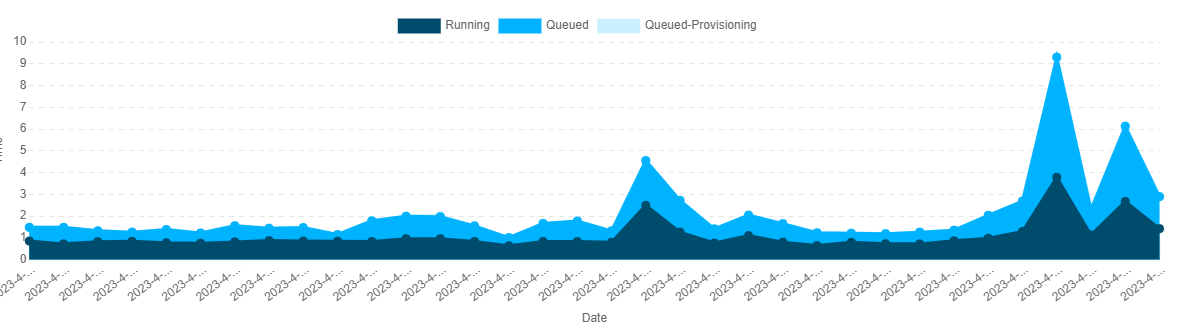 Fig.1. Warehouse Load
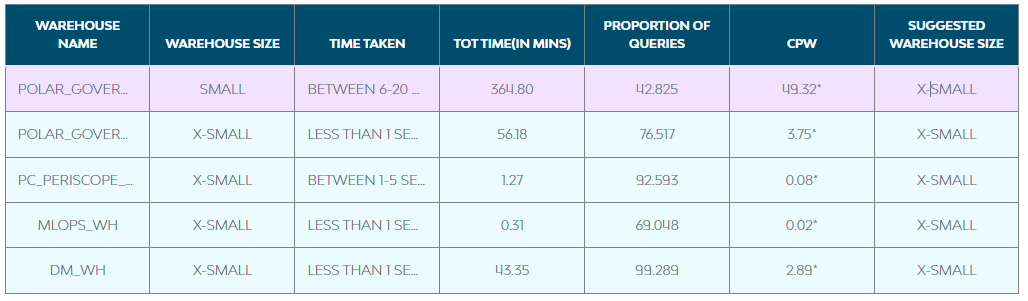 Fig.2. Warehouse Recommendation
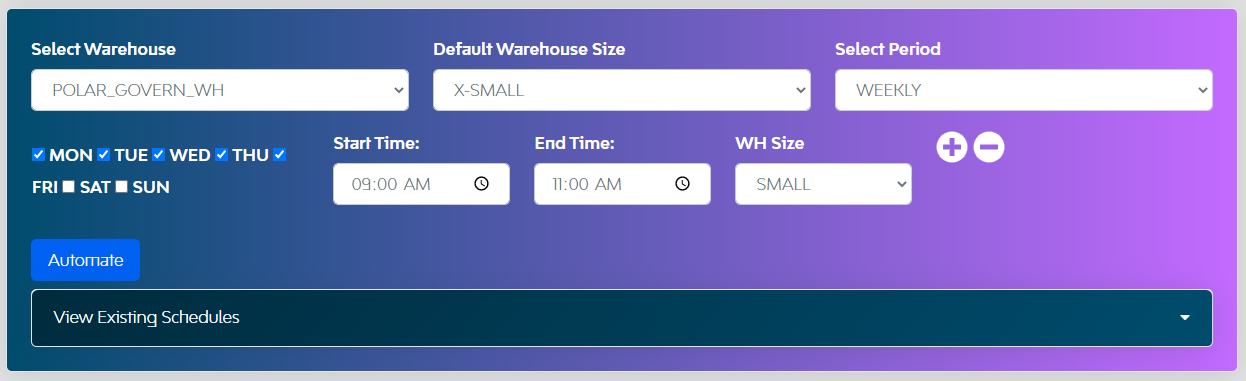 Fig.3 Warehouse Scheduler
These optimization methods can help you get the most out of your snowflake data cloud investment using the snowflake parameters or configurations and LTM PolarSled Govern FinOps.
Instead of only utilizing the warehouse, LTM has integrated all their experience and knowledge into FinOps, which has considerably more potential features like Machine Learning (ML)-based dashboards, chargeback mechanisms, optimizing queries, and more. If you're interested in knowing more, please talk to us.
Fig.3 Warehouse Scheduler
These optimization methods can help you get the most out of your snowflake data cloud investment using the snowflake parameters or configurations and LTM PolarSled Govern FinOps.
Instead of only utilizing the warehouse, LTM has integrated all their experience and knowledge into FinOps, which has considerably more potential features like Machine Learning (ML)-based dashboards, chargeback mechanisms, optimizing queries, and more. If you're interested in knowing more, please talk to us.
-
Setting warehouse type to Snowpark-optimized warehouses
-
Enable multi-clustering in the warehouse
- Standard (Default): When a query is queued, or the system determines that there is one more query to conduct, a new cluster is immediately added. After the first cluster has begun, the following clusters wait 20 seconds before initiating.
- Economy: Before establishing a new cluster, the algorithm predicts if there will be enough query traffic to keep the cluster active for at least 6 minutes.
-
Enable auto-resume
-
Enabling auto-suspend and setting an appropriate timeout for workloads
- Decide on the auto-suspend time after determining the use case and how frequently the queries are executed. Auto-suspend can be set as:
- Additionally, you should never set the auto-suspend time to less than a minute, as the billing incurs for at least a minute once the warehouse is on before switching to a per-second charge. Set the right "STATEMENT_TIMEOUT_IN_SECONDS" for each warehouse after you have determined specific workload patterns to prevent any unexpected surcharges for any inaccurate or ineffective queries.
-
Identifying warehouse patterns or loads
- FinOps has an optimizer dashboard that the user can filter based on the warehouse and specific duration, identify the workloads contributing to the higher load, and move higher loads to different warehouses. This can assist you in correctly separating into warehouses by recognizing workload information, such as tables, to leverage caching under the same department or application.
- Once you have verified that workloads are of the same type, you can enable multi-clustering in the warehouse.
Fig.1. Warehouse Load
-
Selecting the correct size of the warehouse
Fig.2. Warehouse Recommendation
-
Warehouse scheduler
Fig.3 Warehouse Scheduler
These optimization methods can help you get the most out of your snowflake data cloud investment using the snowflake parameters or configurations and LTM PolarSled Govern FinOps.
Instead of only utilizing the warehouse, LTM has integrated all their experience and knowledge into FinOps, which has considerably more potential features like Machine Learning (ML)-based dashboards, chargeback mechanisms, optimizing queries, and more. If you're interested in knowing more, please talk to us.
More Articles For You
 Outcreate Your Business
Outcreate with LTM
Outcreate Together

It’s time to Outcreate