AI-Powered Sales Transformation in Microsoft Dynamics 365

While working with a retail client, I noticed our sales reps spent over six hours updating customer relationship management (CRM) entries weekly. That time loss reduced selling focus, slowed responses, and created data gaps that weakened forecasting and pipeline reviews.
After I enabled Copilot in Microsoft Dynamics 365 Sales, the admin time dropped sharply. Reps redirected hours to discovery calls, follow-ups, and deal strategy. This experience led me to examine where AI practically improves sales work.
In B2B sales, teams struggle with lead prioritization, personalized engagement, and time-consuming updates. These frictions raise cycle times, lower win rates, and create uneven customer experiences.
In the sections ahead, I share my experience and learnings about Microsoft Dynamics 365’s AI capabilities and a scenario I have often discussed with my team to help leaders better understand the tool in action.
Current Challenges in Sales
One of our clients, a SaaS company, struggled with lead qualification and forecasting accuracy. By accuracy, I mean whether predicted close dates, amounts, and win probabilities matched actual outcomes. Their reps spent hours manually researching leads and pipeline predictions, such as stage probabilities, quarter attainment, and coverage ratios, often missing the real situation. These issues are common. Sales teams face pressure to deliver relevant, timely engagement and manage complex customer signals across email, calls, web activity, and product usage. From what I’ve seen across teams, the most persistent challenges include:- Signal-to-noise in leads: Inbound leads lack context or buying intent, so reps chase activity rather than actual demand.
- Account mapping gaps: Stakeholder roles and influence paths are unclear, slowing multi-threading and consensus-building.
- Data hygiene and duplication: Records fragment across tools; version control breaks, and confidence in CRM declines.
- Shadow spreadsheets: Reps maintain offline trackers for quotes and follow-ups, creating inconsistencies and rework.
- Quote-to-cash handoffs: Pricing, approval, and order steps are fragmented, causing delays near the finish line.
- Forecast drift: Commitment, best-case, and upside shifts week to week without clear drivers erode leadership trust.
AI Capabilities in Dynamics 365 Sales
The AI features in MS Dynamics 365 Sales provide practical solutions to common sales problems. While these tools boost productivity, they also need proper setup and user training to achieve the best results. Microsoft Dynamics 365 Sales integrates AI-driven tools that help sales teams address common challenges such as time-consuming admin tasks, limited visibility into deal progress, and inconsistent customer engagement.
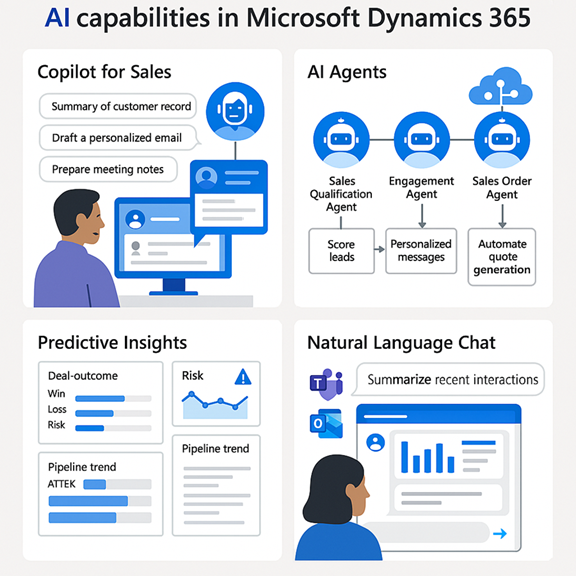
Figure 1: Microsoft Dynamics 365 AI Capabilities
Copilot for Sales
I’ve seen how much time sellers lose on routine tasks. With Copilot in Dynamics 365 Sales, reps can shift that balance and focus more on client conversations. It can support their efforts in three practical ways:- Summarizing Customer Records and Recent Activities: Instead of digging through past emails, notes, and purchase history, they can retrieve concise summaries that help walk into meetings with context already in hand.
- Drafting Personalized Emails: Copilot can generate initial drafts tailored to each client, using interaction history and open opportunities. Reps still need to review and adjust the tone, but starting with a draft can save hours they would otherwise spend writing from scratch.
- Preparing Meeting Notes and Follow-Ups: Copilot automatically generates summaries after client calls and suggests next steps. This is especially useful for ensuring timely and consistent follow-ups by sales reps.
AI Agents
Specialized AI agents can simplify different sales processes for teams. These agents shift the focus from repetitive tasks to meaningful engagement by supporting the following:- Sales Qualification Agent: Instead of manually scoring leads, machine learning models evaluate data points like buyer behavior and firmographics. This helps sales reps focus on accounts with higher conversion potential.
- Engagement Agent: Outreach becomes less generic when messages are tailored to each customer’s preferences and recent interactions. This enables stronger, more relevant connections with prospects and clients.
- Sales Order Agent: Generating quotes and managing approvals is often slow. Automating these steps allows sales teams to move deals forward efficiently, reducing delays caused by manual paperwork.
Predictive Insights
Predictive insights can help sales teams decide where to focus and which risks require the most attention. Instead of relying solely on instinct, sellers now have data-driven support:- Deal Outcome Predictions: Analysis of past deals, engagement history, and communication trends highlights which opportunities are most likely to close, enabling better prioritization.
- Risk Identification: Signals such as stalled conversations or negative sentiment flag at-risk deals, allowing timely intervention before revenue is lost.
- Proactive Pipeline Management: Teams can quickly spot bottlenecks and reallocate resources to maintain a healthy pipeline, reducing quarter-end surprises.
Natural Language Chat
Natural language chat capabilities simplify how teams interact with sales data. Reporting and tool-switching become less frequent:- Conversational Queries: Sellers can ask questions such as “What are my top opportunities this month?” and receive quick, clear answers powered by conversational AI.
- In-App Responses: Contextual insights and next-step recommendations surface within the workflow, enabling teams to stay focused without toggling between dashboards.
Scenario: Closing a Strategic SaaS Deal
Anita is a sales rep at a mid-sized SaaS firm. When a new inbound lead appears, she works on the deal using AI features in Dynamics 365 Sales. Step 1: AI-Powered Lead Qualification Anita receives a lead: Ravi Mehta, CTO at a growing fintech. Predictive Lead Scoring analyzes firmographics, engagement history, and buying signals. The score is 89/100, so she prioritizes the lead. Step 2: Relationship Intelligence Using “Who Knows Whom,” the system finds a colleague who worked with Ravi earlier. To start on familiar ground, Anita requests a warm introduction. Step 3: Engagement Insights Relationship Analytics shows multiple opened emails, a whitepaper download, and a recent webinar. The engagement is marked “Hot.” Anita schedules a demo while interest is high. Step 4: Copilot Assistance Copilot summarizes the account, recent interactions, and key pain points for demo prep. It also drafts a follow-up email she can refine and send. Step 5: Virtual Agent Support Ravi visits the website and chats with a Power Virtual Agent about pricing tiers. The bot answers and automatically updates the CRM with his preferences. Step 6: Automated Opportunity and Quote After Ravi signals interest, the system creates an opportunity and a template-tailored quote. Anita reviews the details and sends the quote with one click. Thanks to AI-driven workflows, Anita closes the deal in just 5 days. The personalized outreach, timely insights, and sales process automation let her focus on building relationships and delivering value.Conclusion
From automating routine work to surfacing timely insights, I’ve seen AI shift sellers' focus on conversations and client trust. Based on my learnings and observations, a few practices stand out:- Start small with one capability at a time and track impact, such as using predictive scoring in a single region before scaling across all markets. Rolling out too much at once leads to confusion, low adoption, and missed wins you can’t measure.
- Focus on adoption by training sales teams through role-play sessions or guided use cases, so AI becomes part of daily workflows. Otherwise, teams fall back on old habits, and investment in new tools goes to waste.
- Monitor outcomes by measuring productivity and engagement shifts, like shorter deal cycles or stronger client follow-through, to validate the business case. Ignoring the metrics means missing both what’s working and where things are getting stuck.
 Outcreate Your Business
Outcreate with LTM
Outcreate Together

It’s time to Outcreate